Revert Claimed but Unused Loyalty Reward Discount Coupons
Introduction
Sometimes, customers may claim a loyalty reward discount coupon but do not complete a purchase using it. In such cases, you may want to restore the used points to maintain accurate loyalty balances. This article explains how to revert claimed but unused loyalty reward discount coupons, ensuring points are returned to customers when the reward is not redeemed.
Here are the steps to Revert unused discount coupons:
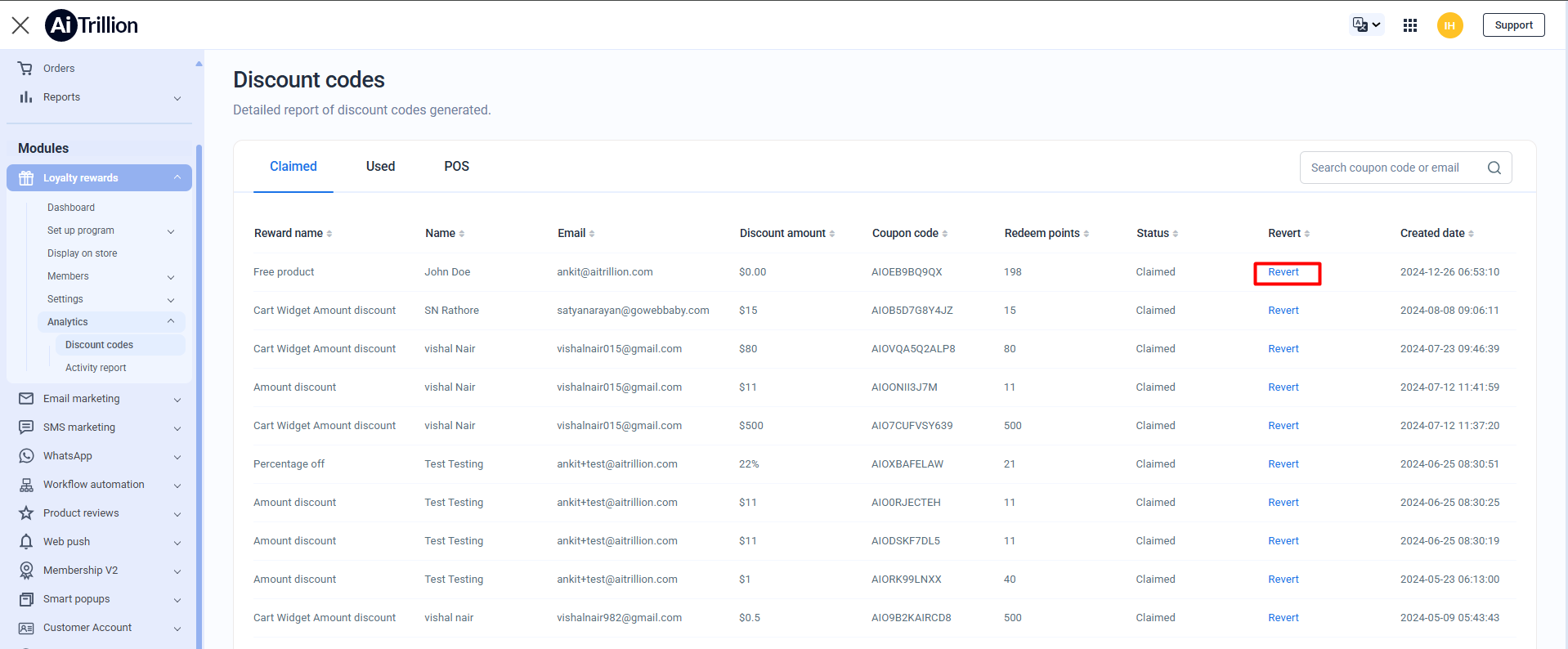
Step 2: In the Claimed tab, find the specific coupon you want to revert and click on the "Revert" link associated with the coupon.

Note: Before reverting the customer's point, note the following points:
1.) When a coupon is reverted, the discount quantity is automatically reset to zero in Shopify
2.) The redeemed points by the customer are restored to available points.
2.) The redeemed points by the customer are restored to available points.
?
Step 3: Click on Confirm
Now, the claimed discount code has been reverted.
The customer can also see the reverted points by the store owner
Important Notes
-
Reverting a claimed discount coupon can only be done if the coupon has not been used in any completed order.
Reverted coupons cannot be used again by the customer.
This action affects future transactions only and does not impact past or completed orders.