Test a WhatsApp Message Before Sending
Introduction
Testing your WhatsApp message before sending it to customers helps ensure that everything appears and functions as expected. It allows you to review the message content, formatting, personalization, and links, reducing the chances of errors in live communication.
With the test message feature, you can send a sample WhatsApp message to yourself or your team to verify accuracy before launching it to a wider audience. This helps maintain a professional customer experience and ensures your messaging delivers the intended impact.

Note:
- You can send up to 4 test messages for marketing templates, beyond that, Meta may limit or stop additional WhatsApp test messages due to capping.
- If a number is capped, the restriction may be lifted within 24 hours to up to one week.
- The limit of up to 4 test messages is counted across all sources—Workflows, Campaigns, test WhatsApp messages, and Broadcasts. If more than 4 marketing template messages are sent across these sources, Meta may restrict or block further message sending.
There are two places from which you can send test messages:
- WhatsApp marketing template
- Team Inbox
WhatsApp marketing template
Here are the steps to send a test WhatsApp message for preview:
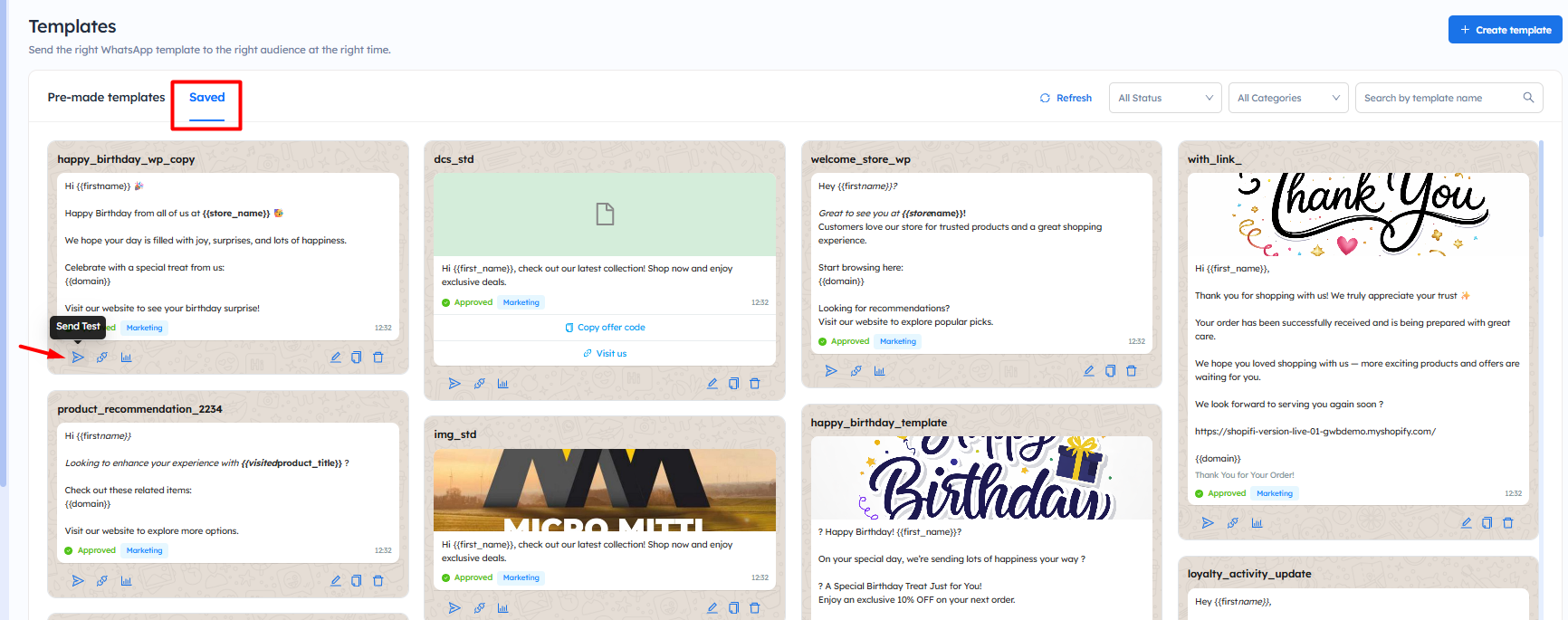
Step 2: Now, if you want to test a pre-made template, click here to learn how to use it. Once it appears in the Saved tab or you have saved the template, Click on the Saved tab, then click on the Send Test icon as shown in the image.
Step 3: Add the shortcode data. For example, here three shortcodes are used: first name, store name, and domain. Also, enter the test phone number where you want to send the WhatsApp message and click on the Send Test Now button.

Note:
- Ensure that you have used the correct template with the correct Shortcode.
- The number must be entered with the country code, but without the plus (+) sign.
Note: It is not recommended to send test messages to customers. If there is any further conversation on that message, you will not be able to view it.
Now, the WhatsApp test messages will be sent to the entered number
Check the WhatsApp Test Report for a Specific Template
Here are the steps to check the WhatsApp test report for a specific template:
Step 2: Click on the Saved tab and click on the report icon of the template that you have send for the test.
Step 3: Click on the drop down menu and select the test option.
Now, you will get the detailed WhatsApp test report that will help you analyze how your test message performed, giving you insights into delivery, engagement, and overall message effectiveness before sending it to customers.
The available report includes:
Overview Section
-
Sent vs. Delivered
Shows how many test messages were sent and how many were successfully delivered.
In this example, 1 message was sent but not delivered, resulting in a 0% delivery rate. -
Delivered vs. Read
Indicates how many delivered messages were opened by recipients.
Since no message was delivered, the read rate is 0%. -
Read vs. Clicked
Tracks user interaction with links inside the message.
With no reads, the click rate is also 0%.
Campaign Metadata
- Campaign Name: Displays the name of the test campaign
- Total Recipients: Number of test recipients (here, 1)
- Status: Shows whether the campaign is active
- Created Date: Indicates when the test was initiated
Performance Grid:
Provides a quick summary of key metrics:
- Sent: 1 message sent
- Delivered: 0 messages delivered
- Read: 0 messages opened
- Clicked: 0 interactions
- Failed: 0 failures recorded
- Total Orders / Revenue: No conversions from the test message
Delivery Failures:
- Displays failed message attempts
- In this case, no failures are recorded, but the message is still not delivered, which may indicate:
- Invalid or inactive test number
- WhatsApp restrictions or capping
-
Template or approval issues
Important Notes
- You can send up to 4 test messages for marketing templates per week per account, this limit is counted across Workflows, Campaigns, Broadcasts, and test sends.
- If the limit is exceeded, Meta may restrict or block further test messages temporarily.
- If your number is capped, the restriction may be removed within 24 hours to up to one week.
- Always enter the phone number with the country code but without the (+) sign.
- Ensure all shortcode variables are properly filled before sending the test message.
- It is recommended to send test messages to yourself or your team, not to customers.
- Test messages may not reflect real-time delivery behavior due to Meta policies or restrictions.
- If the message is not delivered, verify that the template is approved and the number is active on WhatsApp.
- Use the test report to identify delivery or formatting issues before sending messages to customers.
-
Always review the message content, links, and personalization to ensure a smooth customer experience.