Review Ratings on the Collection Page
Introduction
Displaying review ratings on the collection page helps customers quickly evaluate products without needing to open each product individually. By showcasing star ratings alongside product listings, you can enhance visibility of customer feedback, build trust, and make it easier for shoppers to compare items at a glance. This feature improves the browsing experience and can help drive more informed purchasing decisions.
The updated rating block shows the star rating, the average rating and the number of reviews on each product card. When a shopper hovers over the review count, a dropdown opens with the rating breakdown (5 to 1 stars) and a See all customer reviews link to the product page. Its styling now comes from a separate stylesheet, reviewRating-min.css, which you add to your theme in this article.
 Note: The steps below apply only to the Shopify Horizon or Dawn theme. If you want to set this up on other themes, please contact our support team at support@aitrillion.com.
Before You Begin: Enable the Product Reviews Module
Ratings appear on the collection page only while the
Product reviews module is enabled. If the module is turned off, the rating
block hides itself automatically.
Step 1: In the
AiTrillion admin panel, go to Product reviews >> Dashboard in the
left-hand menu.
Step 2: At the top
right of the Product review dashboard, turn on the Enable toggle. When
the toggle is blue, the Product Reviews module is active on your store.
Here are the steps to show Review Ratings on the Collection Page:
setTimeout(function() {
if(typeof AioAppConfig?.getAccessModuleStatusInfo?.moduleStatusData?.review_module_status !== 'undefined') {
if (AioAppConfig?.getAccessModuleStatusInfo?.moduleStatusData?.review_module_status == 0 ) {
let arrayContainer = Array.from(document.getElementsByClassName('product-review-star-container'));
arrayContainer.forEach(function(element, index, array) {
return element.style.display = 'none';
});
}
}
}, 1500);
</script>
<div class="product-review-star-container">
{%- assign group_id = product.metafields.custom.aitrillion_group_id.value -%}
{%- if group_id != blank -%}
{%- capture group_key -%}aitrillion_group_{{ group_id }}{%- endcapture -%}
{%- assign group_reviews = shop.metafields.custom[group_key].value -%}
{%- if group_reviews != blank -%}
{%- assign reviews = group_reviews.reviews -%}
{%- else -%}
{%- assign reviews = product.metafields.custom.aitrillion_reviews.value -%}
{%- endif -%}
{%- else -%}
{%- assign reviews = product.metafields.custom.aitrillion_reviews.value -%}
{%- endif -%}
{%- capture star_path -%}M13.4983 0.896992L16.7123 8.50399L24.9403 9.21099C25.0672 9.22202 25.1881 9.27015 25.2878 9.34939C25.3876 9.42862 25.4618 9.53545 25.5012 9.65656C25.5407 9.77768 25.5436 9.90773 25.5097 10.0305C25.4757 10.1533 25.4064 10.2633 25.3103 10.347L19.0673 15.754L20.9373 23.798C20.9658 23.922 20.9571 24.0516 20.9124 24.1707C20.8677 24.2897 20.789 24.393 20.686 24.4677C20.583 24.5423 20.4603 24.585 20.3332 24.5904C20.2061 24.5958 20.0803 24.5636 19.9713 24.498L12.9003 20.233L5.83033 24.5C5.72138 24.5656 5.59552 24.5978 5.46844 24.5924C5.34136 24.587 5.21867 24.5443 5.11567 24.4697C5.01268 24.395 4.93392 24.2917 4.88923 24.1727C4.84453 24.0536 4.83587 23.924 4.86433 23.8L6.73433 15.756L0.491328 10.348C0.394805 10.2646 0.325061 10.1545 0.290837 10.0316C0.256614 9.90867 0.259435 9.77839 0.298947 9.65708C0.338459 9.53577 0.412904 9.42882 0.512948 9.34964C0.612991 9.27046 0.734182 9.22258 0.861327 9.21199L9.08933 8.50499L12.3033 0.896992C12.3527 0.779297 12.4358 0.678813 12.5421 0.608148C12.6484 0.537484 12.7732 0.499786 12.9008 0.499786C13.0285 0.499786 13.1533 0.537484 13.2596 0.608148C13.3659 0.678813 13.4489 0.779297 13.4983 0.896992Z{%- endcapture -%}
{%- capture star_filled -%}<svg width="26" height="25" viewBox="0 0 26 25" fill="none" xmlns="http://www.w3.org/2000/svg"><path d="{{ star_path }}" fill="currentColor"></path></svg>{%- endcapture -%}
{%- capture star_empty -%}<svg width="26" height="25" viewBox="0 0 26 25" fill="none" xmlns="http://www.w3.org/2000/svg"><path d="{{ star_path }}" fill="#E1DFE5"></path></svg>{%- endcapture -%}
{%- capture star_grey -%}<svg width="26" height="25" viewBox="0 0 26 25" fill="none" xmlns="http://www.w3.org/2000/svg"> <path d="{{ star_path }}" fill="#e0e0e0"></path> </svg>{%- endcapture -%}
{% if reviews %}
{% assign ratingcount = reviews.total_reviews %}
{%- assign rating = reviews.average_rating -%}
{%- assign star_pct = rating | times: 20.0 | round: 2 | append: '%' -%}
{%- comment -%} rating breakdown for the dropdown (same maths as the review form block) {%- endcomment -%}
{%- assign star_nums = '5,4,3,2,1' | split: ',' -%}
{%- assign _safe_total = ratingcount | default: 0 | plus: 0 | at_least: 1 -%}
{%- assign _c5 = reviews['5_star'] | default: 0 | plus: 0 -%}
{%- assign _c4 = reviews['4_star'] | default: 0 | plus: 0 -%}
{%- assign _c3 = reviews['3_star'] | default: 0 | plus: 0 -%}
{%- assign _c2 = reviews['2_star'] | default: 0 | plus: 0 -%}
{%- assign _c1 = reviews['1_star'] | default: 0 | plus: 0 -%}
{%- assign _v5 = _c5 | times: 200.0 | divided_by: _safe_total | round -%}
{%- assign _v4 = _c4 | times: 200.0 | divided_by: _safe_total | round -%}
{%- assign _v3 = _c3 | times: 200.0 | divided_by: _safe_total | round -%}
{%- assign _v2 = _c2 | times: 200.0 | divided_by: _safe_total | round -%}
{%- assign _v1 = _c1 | times: 200.0 | divided_by: _safe_total | round -%}
{%- assign _w5 = _c5 | times: 100.0 | divided_by: _safe_total | round | append: '%' -%}
{%- assign _w4 = _c4 | times: 100.0 | divided_by: _safe_total | round | append: '%' -%}
{%- assign _w3 = _c3 | times: 100.0 | divided_by: _safe_total | round | append: '%' -%}
{%- assign _w2 = _c2 | times: 100.0 | divided_by: _safe_total | round | append: '%' -%}
{%- assign _w1 = _c1 | times: 100.0 | divided_by: _safe_total | round | append: '%' -%}
{%- assign star_vals = _v5 | append: ',' | append: _v4 | append: ',' | append: _v3 | append: ',' | append: _v2 | append: ',' | append: _v1 | split: ',' -%}
{%- assign star_widths = _w5 | append: ',' | append: _w4 | append: ',' | append: _w3 | append: ',' | append: _w2 | append: ',' | append: _w1 | split: ',' -%}
{%- assign star_counts = _c5 | append: ',' | append: _c4 | append: ',' | append: _c3 | append: ',' | append: _c2 | append: ',' | append: _c1 | split: ',' -%}
<div class="aio-review-ratings">
<div class="aio-rr-dropdown">
<div class="star-container">
<span class="ai-review-stars">
<div class="aio_egg_star-ratings-css">
<div class="aio_egg_star-ratings-css-top" style="width:{{ star_pct }};color:#FFD700;">
{%- for i in (1..5) -%}
{{ star_filled }}
{%- endfor -%}
</div>
<div class="aio_egg_star-ratings-css-bottom">
{%- for i in (1..5) -%}
{{ star_empty }}
{%- endfor -%}
</div>
</div>
</span>
<span class="aio-rr-rating-value">{{ rating }}</span>
</div>
{%- if ratingcount > 0 -%}
<button type="button" class="aio-rr-dropdown-toggle">
<span class="ai-review-stars-text">({{ ratingcount }}<span class="aio-reviews-text-only">Reviews</span>)</span>
<svg class="caret" width="13" height="8" viewBox="0 0 13 8" fill="none" xmlns="http://www.w3.org/2000/svg"><path fill-rule="evenodd" clip-rule="evenodd" d="M5.57938 7.59423C5.93681 7.95166 6.51632 7.95166 6.87375 7.59423L11.9585 2.50949C12.3159 2.15206 12.3159 1.57255 11.9585 1.21512C11.6011 0.857693 11.0216 0.857693 10.6641 1.21512L6.22656 5.65269L1.789 1.21512C1.43157 0.857693 0.852063 0.857693 0.494634 1.21512C0.137205 1.57255 0.137205 2.15206 0.494634 2.50949L5.57938 7.59423Z" fill="currentColor"></path></svg>
</button>
<div class="aio-rr-dropdown-menu">
{%- capture rr_count_html -%}<strong>{{ ratingcount }}</strong>{%- endcapture -%}
{%- assign base_on_reviews_text = 'Based on {number_of_review} reviews' | replace: '{number_of_review}', rr_count_html -%}
<div class="aio-rr-based-on">{{ base_on_reviews_text }}</div>
{%- for i in (0..4) -%}
<div class="rating_progress">
<label>{{ star_nums[i] }} <span>★</span></label>
<div class="progress">
<progress class="progress{{ forloop.index }}" value="{{ star_vals[i] }}" max="200"></progress>
<output style="width:{{ star_widths[i] }};background:#FFD700;"></output>
</div>
<span class="show_strval">({{ star_counts[i] }})</span>
</div>
{%- endfor -%}
{%- if 'See all customer reviews' != blank -%}
<a class="aio-rr-see-all" href="{{ product.url }}#aio-product-detial-reviews-v2">
<span>See all customer reviews</span>
<svg width="7" height="11" viewBox="0 0 7 11" fill="none" xmlns="http://www.w3.org/2000/svg" aria-hidden="true"><path d="M1 1L5.5 5.5L1 10" stroke="currentColor" stroke-width="1.6" stroke-linecap="round" stroke-linejoin="round"></path></svg>
</a>
{%- endif -%}
</div>
{%- else -%}
<span class="ai-review-stars-text">({{ ratingcount }})<span class="aio-reviews-text-only">Reviews</span></span>
{%- endif -%}
</div><!-- /.aio-rr-dropdown -->
</div><!-- /.aio-review-ratings -->
{% else %}
<div class="aio-review-ratings">
<span class="ai-review-stars">
{%- for i in (1..5) -%}
<span class="fa_star_o">{{ star_grey }}</span>
{%- endfor -%}
</span>
<span class="no_reviews"> No reviews </span>
</div>
{% endif %}
</div><!-- /.product-review-star-container -->
Note: This code replaces the earlier version of review-rating-V2.liquid. If you set this up before, replace the whole content of the file with the code above.
Add the reviewRating-min.css stylesheet
Step 4: In the
code editor, click the assets folder, then click the add file icon and
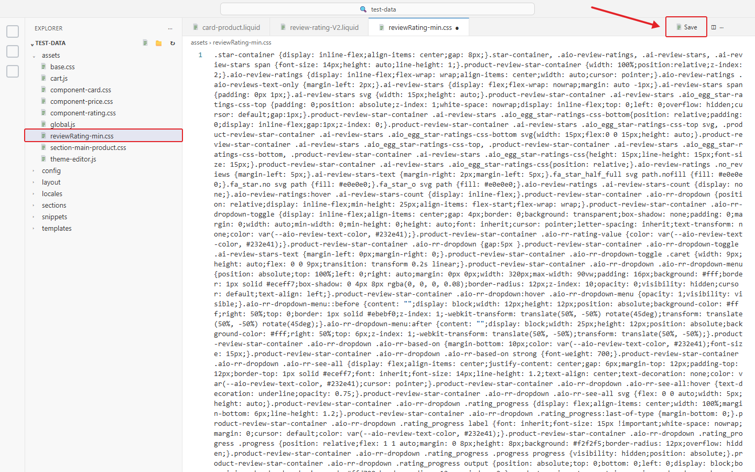
name the new file reviewRating-min.css.
Step 5: Copy the
CSS below, paste it into reviewRating-min.css, and click on the Save
button.
.star-container
{display: inline-flex;align-items: center;gap: 8px;}.star-container,
.aio-review-ratings, .ai-review-stars, .ai-review-stars span {font-size:
14px;height: auto;line-height: 1;}.product-review-star-container {width:
100%;position:relative;z-index: 2;}.aio-review-ratings {display:
inline-flex;flex-wrap: wrap;align-items: center;width: auto;cursor:
pointer;}.aio-review-ratings .aio-reviews-text-only {margin-left:
2px;}.ai-review-stars {display: flex;flex-wrap: nowrap;margin: auto -1px;}.ai-review-stars
span {padding: 0px 1px;}.ai-review-stars svg {width: 15px;height:
auto;}.product-review-star-container .ai-review-stars
.aio_egg_star-ratings-css-top {padding: 0;position: absolute;z-index:
1;white-space: nowrap;display: inline-flex;top: 0;left: 0;overflow:
hidden;cursor: default;gap:1px;}.product-review-star-container .ai-review-stars
.aio_egg_star-ratings-css-bottom{position: relative;padding: 0;display:
inline-flex;gap:1px;z-index: 0;}.product-review-star-container .ai-review-stars
.aio_egg_star-ratings-css-top svg, .product-review-star-container
.ai-review-stars .aio_egg_star-ratings-css-bottom svg{width: 15px;flex:0 0
15px;height: auto;}.product-review-star-container .ai-review-stars
.aio_egg_star-ratings-css-top, .product-review-star-container .ai-review-stars
.aio_egg_star-ratings-css-bottom, .product-review-star-container
.ai-review-stars .aio_egg_star-ratings-css{height: 15px;line-height:
15px;font-size: 15px;}.product-review-star-container .ai-review-stars
.aio_egg_star-ratings-css{position: relative;}.aio-review-ratings .no_reviews
{margin-left: 5px;}.ai-review-stars-text {margin-right: 2px;margin-left:
5px;}.fa_star_half_full svg path.nofill {fill: #e0e0e0;}.fa_star.no svg path
{fill: #e0e0e0;}.fa_star_o svg path {fill: #e0e0e0;}.aio-review-ratings
.ai-review-stars-count {display: none;}.aio-review-ratings:hover
.ai-review-stars-count {display: inline-flex;}.product-review-star-container
.aio-rr-dropdown {position: relative;display: inline-flex;min-height:
25px;align-items: flex-start;flex-wrap: wrap;}.product-review-star-container
.aio-rr-dropdown-toggle {display: inline-flex;align-items: center;gap:
4px;border: 0;background: transparent;box-shadow: none;padding: 0;margin:
0;width: auto;min-width: 0;min-height: 0;height: auto;font: inherit;cursor:
pointer;letter-spacing: inherit;text-transform: none;color:
var(--aio-review-text-color, #232e41);}.product-review-star-container
.aio-rr-rating-value {color: var(--aio-review-text-color,
#232e41);}.product-review-star-container .aio-rr-dropdown {gap:5px
}.product-review-star-container .aio-rr-dropdown-toggle .ai-review-stars-text
{margin-left: 0px;margin-right: 0;}.product-review-star-container
.aio-rr-dropdown-toggle .caret {width: 9px;height: auto;flex: 0 0
9px;transition: transform 0.2s linear;}.product-review-star-container
.aio-rr-dropdown .aio-rr-dropdown-menu {position: absolute;top: 100%;left:
0;right: auto;margin: 0px 0px;width: 320px;max-width: 90vw;padding:
16px;background: #fff;border: 1px solid #eceff7;box-shadow: 0 4px 8px rgba(0, 0,
0, 0.08);border-radius: 12px;z-index: 10;opacity: 0;visibility: hidden;cursor:
default;text-align: left;}.product-review-star-container .aio-rr-dropdown:hover
.aio-rr-dropdown-menu {opacity: 1;visibility:
visible;}.aio-rr-dropdown-menu::before {content: "";display:
block;width: 12px;height: 12px;position: absolute;background-color: #fff;right:
50%;top: 0;border: 1px solid #ebebf0;z-index: 1;-webkit-transform:
translate(50%, -50%) rotate(45deg);transform: translate(50%, -50%)
rotate(45deg);}.aio-rr-dropdown-menu:after {content: "";display:
block;width: 25px;height: 12px;position: absolute;background-color: #fff;right:
50%;top: 6px;z-index: 1;-webkit-transform: translate(50%, -50%);transform:
translate(50%, -50%);}.product-review-star-container .aio-rr-dropdown
.aio-rr-based-on {margin-bottom: 10px;color: var(--aio-review-text-color,
#232e41);font-size: 15px;}.product-review-star-container .aio-rr-dropdown
.aio-rr-based-on strong {font-weight: 700;}.product-review-star-container
.aio-rr-dropdown .aio-rr-see-all {display: flex;align-items:
center;justify-content: center;gap: 6px;margin-top: 12px;padding-top:
12px;border-top: 1px solid #eceff7;font: inherit;font-size: 14px;line-height:
1.2;text-align: center;text-decoration: none;color: var(--aio-review-text-color,
#232e41);cursor: pointer;}.product-review-star-container .aio-rr-dropdown
.aio-rr-see-all:hover {text-decoration: underline;opacity:
0.75;}.product-review-star-container .aio-rr-dropdown .aio-rr-see-all svg
{flex: 0 0 auto;width: 5px;height: auto;}.product-review-star-container
.aio-rr-dropdown .rating_progress {display: flex;align-items: center;width:
100%;margin-bottom: 6px;line-height: 1.2;}.product-review-star-container
.aio-rr-dropdown .rating_progress:last-of-type {margin-bottom:
0;}.product-review-star-container .aio-rr-dropdown .rating_progress label
{font: inherit;font-size: 15px !important;white-space: nowrap;margin: 0;cursor:
default;color: var(--aio-review-text-color,
#232e41);}.product-review-star-container .aio-rr-dropdown .rating_progress .progress
{position: relative;flex: 1 1 auto;margin: 0 8px;height: 8px;background:
#f2f2f5;border-radius: 12px;overflow: hidden;}.product-review-star-container
.aio-rr-dropdown .rating_progress .progress progress {visibility:
hidden;position: absolute;}.product-review-star-container .aio-rr-dropdown
.rating_progress output {position: absolute;top: 0;bottom: 0;left: 0;display:
block;box-sizing: border-box;background: #ffd700;border-radius: 12px;z-index:
2;}.product-review-star-container .aio-rr-dropdown .show_strval {font:
inherit;font-size: 14px;white-space: nowrap;color: var(--aio-review-text-color,
#232e41);}@media (max-width: 749px) {.product-review-star-container
.aio-rr-dropdown .aio-rr-based-on{font-size:14px
}.product-review-star-container .aio-rr-dropdown .rating_progress
{margin-bottom:6px !important;}.product-review-star-container .aio-rr-dropdown
.aio-rr-see-all{font-size:13px }.product-review-star-container .aio-rr-dropdown
.rating_progress label, .product-review-star-container .aio-rr-dropdown .show_strval{font-size:13px
!important;}.product-review-star-container .aio-rr-dropdown .rating_progress
.progress{height:6px }.grid--2-col-tablet-down .grid__item
.product-review-star-container .aio-rr-dropdown
.aio-rr-dropdown-menu{padding:12px 10px !important;}}@media (max-width: 600px)
{.product-review-star-container .aio-rr-dropdown .aio-rr-dropdown-menu {width:
280px;max-width:100% }}
Step 6: Open card-product.liquid
under Snippets. At the top of the file, find the existing CSS
lines (the lines ending in stylesheet_tag), paste the code below just
below the last existing CSS line, and click on Save.
{{
'reviewRating-min.css' | asset_url | stylesheet_tag }
Note: Paste the line below any existing CSS, never above it, so that the review styles load after the theme’s own styles. If card-product.liquid has no stylesheet lines at the top, paste it on the first line of the file (after the opening {% comment %} … {% endcomment %} block, if there is one).
Note: The file name must match exactly, including the capital R: reviewRating-min.css. If the name in the Assets folder is different, the stars and the rating dropdown will appear unstyled.
Step 7:** Copy the shortcode below:
{% render 'review-rating-V2', product: card_product %}
If you are using the Horizon theme -
{% render 'review-rating-V2', product: card_product %}
Note: Horizon does not have a card-product.liquid file. On Horizon, paste the stylesheet line from Step 6 at the top of product-title.liquid instead, above the shortcode.
If you are using the DAWN theme -
Hover over the review count to open the rating breakdown.
Change Review Color on Collection Page
Remove the " No reviews " text from the collection page
Now, the "No reviews" text will no longer appear on the collection page.
Important Notes
- These steps are theme-dependent and are specifically applicable to Shopify Dawn or Horizon themes.
- Before making any changes, it is recommended to duplicate your theme as a backup.
-
Ensure you paste the code in the correct file and location (e.g., card-product.liquid
or
product-title.liquid) to avoid display issues. - Make sure
reviewRating-min.css is in the Assets folder and its stylesheet line is at the
top of card-product.liquid, below any existing CSS. Without it, the ratings
will show without their styling.
- Even a small error in the code may break the layout, so double-check the code before saving.
- After adding the code, click Save and refresh your storefront to verify the changes.
- For color changes, ensure the hex code is valid and matches your store’s design.
-
If you are using a different theme, the file structure may vary—consider contacting support for assistance.