Enable Product Review Floating Button
Introduction
Enabling the Product Review Floating Button allows customers to quickly access the reviews from anywhere on your store. This feature adds a convenient, always-visible button that encourages engagement and makes it easier for shoppers to view feedback or share their own experiences. By simplifying access to reviews, you can improve customer interaction and increase the number of reviews collected on your products.
Here are the steps to enable/disable the Site/Product reviews on the front store:
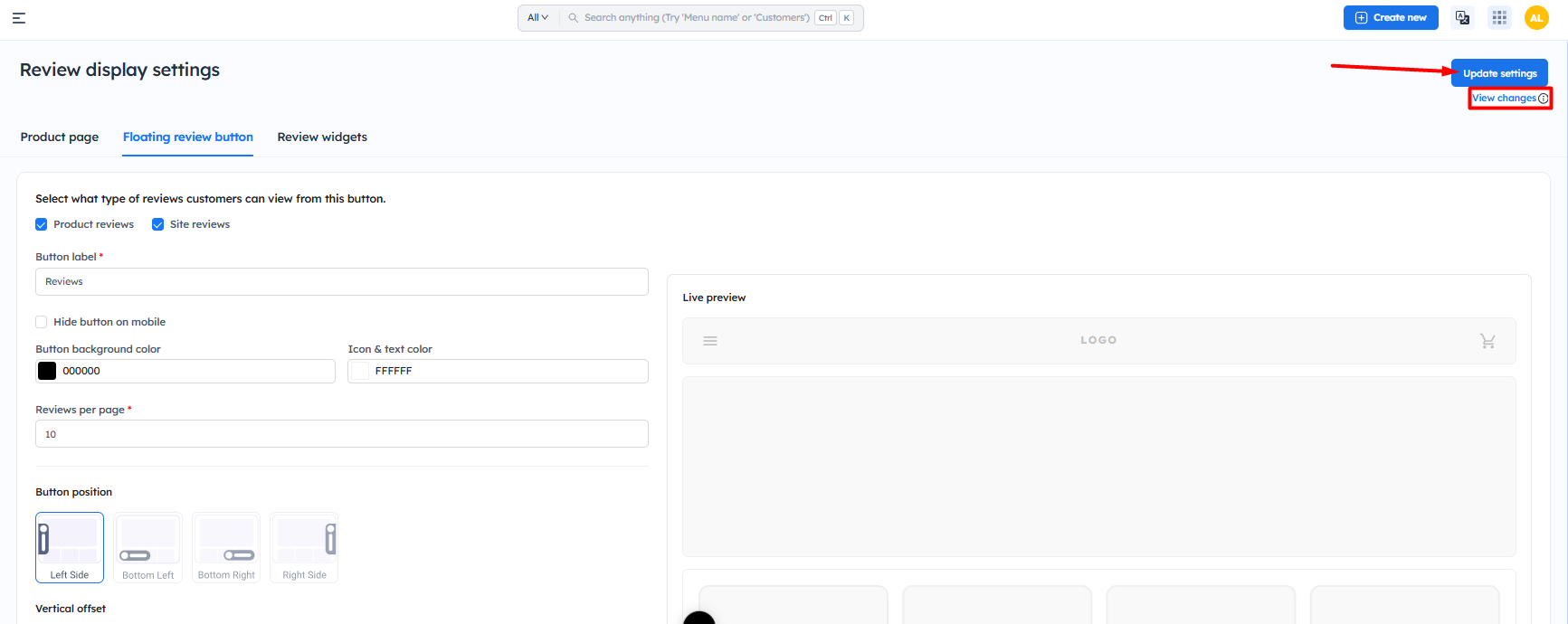
Step 2: Now, select the reviews which you would like to display on the settings -- Select what type of reviews customers can view from this button.
- Product review
- Site review
Step 3: Click on Save/Update settings

Note:
1.) Ensure that the app block is enabled. To enable the app block - Click here
2.) Similarly, you can remove the button on the website by disabling both Product review and site review button
1.) Ensure that the app block is enabled. To enable the app block - Click here
2.) Similarly, you can remove the button on the website by disabling both Product review and site review button
Now the review button will be visible on the front store
 To customize product review or site review button - Click here
Important Notes
- Ensure the app block is enabled in your Shopify theme, otherwise, the floating review button will not appear.
- You must select at least one option (Product Reviews or Site Reviews) to display the button.
- Click Save / Update Settings after making changes to apply them.
- If both Product Reviews and Site Reviews are disabled, the floating button will be hidden from the storefront.
- Changes may take a few moments to reflect on your store.
- Verify the button placement to ensure it does not overlap with other elements on your website.
-
Use the preview section to confirm how the button will appear before saving.