VIP Tier Year-End Achievement and Renewal Notifications
Introduction
The VIP Tier Year-End Achievement and Renewal Notifications feature helps keep customers informed about their VIP tier progress and renewal status at the end of the qualification period. Customers can view how many points they have earned during the current year and whether they have successfully secured their VIP tier for the upcoming year. These notifications encourage continued engagement with your loyalty program by providing clear visibility into tier achievements and renewal eligibility.

Note: This setting only works with Amount spent and Points earned when "One calendar year" or "365 days from the last tier upgrade" is selected under "A member has the following amount of time to achieve a VIP tier." If any other option is selected, the Year-End Progress and Renewal Status notifications will not be sent.
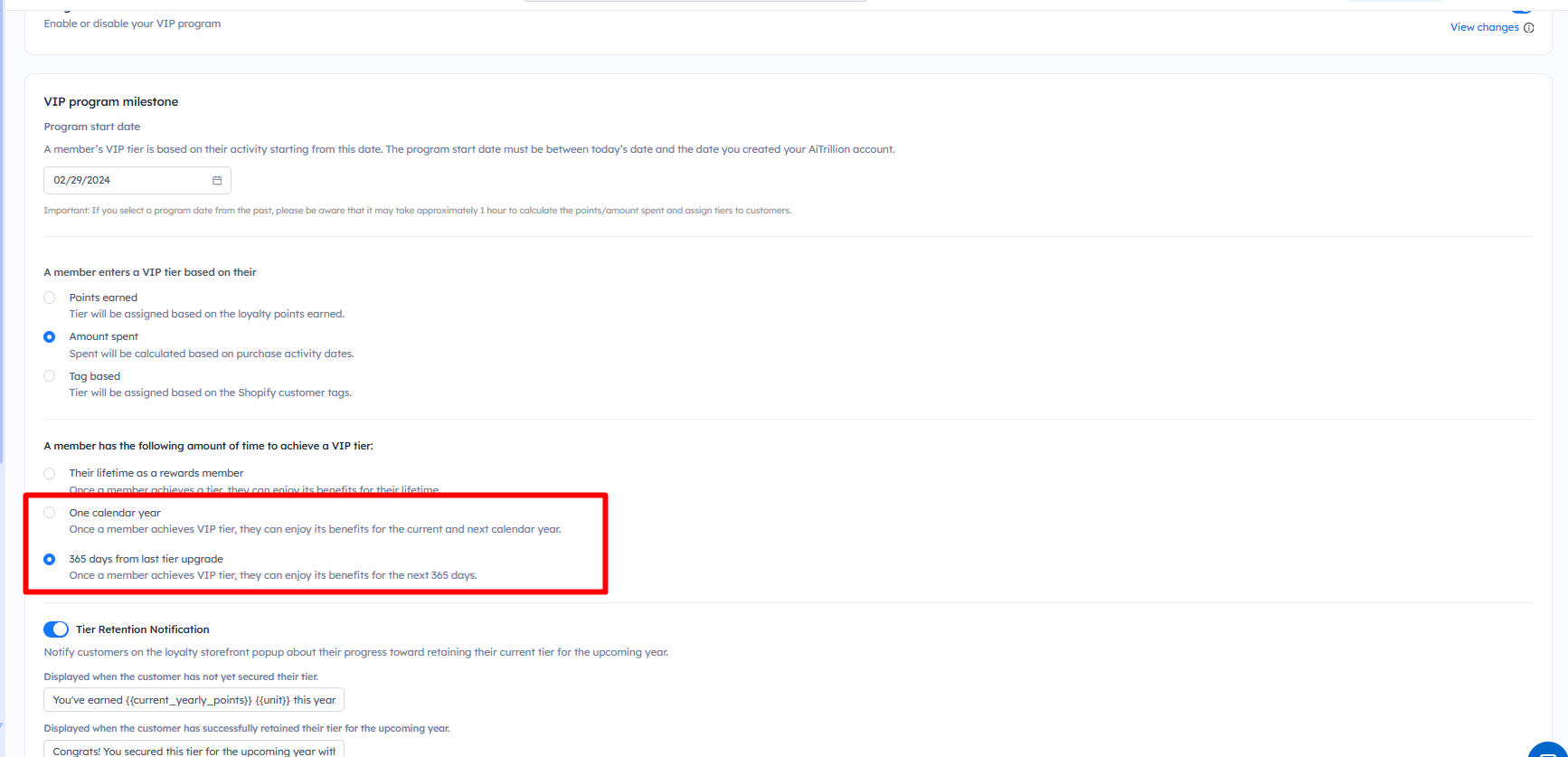
Here are the steps to configure and send VIP Tier Year-End Progress and Renewal Status Notifications:
Step 1: Go to Loyalty rewards >> Set up program >> VIP program
Step 2: Ensure that either "One Calendar Year" or "365 Days from Tier Upgrade" is selected. Then, scroll down to the Tier Retention Notification section and enable it.
Step 3: Edit the text that will be displayed in popup - displayed when a customer has not yet secured their tier and when a customer has successfully retained their tier for the upcoming year according to your requirements.
Now, customers will be able to see the VIP tier achievements in the Loyalty Rewards popup on your storefront.
Important Notes
- This feature is only available when "One Calendar Year" or "365 Days from Tier Upgrade" is selected under "A member has the following amount of time to achieve a VIP tier."
- Notifications are shown only within the Loyalty Rewards popup on your storefront.
- The notification content can be customized to match your brand's messaging and loyalty program requirements.
- Customers who have not yet secured their VIP tier for the upcoming period will see a progress notification.
- Customers who have successfully secured their VIP tier for the upcoming period will see a renewal confirmation notification.
- Ensure your VIP tiers and qualification rules are configured correctly before enabling these notifications.
- The notification will only be displayed to customers who are enrolled in the loyalty program and are eligible for a VIP tier.