Reply to Customer’s Reviews
Introduction
Responding to customer reviews is an important part of building trust and maintaining strong relationships with your customers. By replying to reviews—whether positive or negative—you show that you value customer feedback and are actively engaged in improving their experience.
With the Reply to Customer’s Reviews feature, you can easily respond to feedback directly from your dashboard. Timely and thoughtful replies not only help address customer concerns but also enhance your brand credibility and encourage future purchases.
Here are the steps below to reply to customers' reviews:
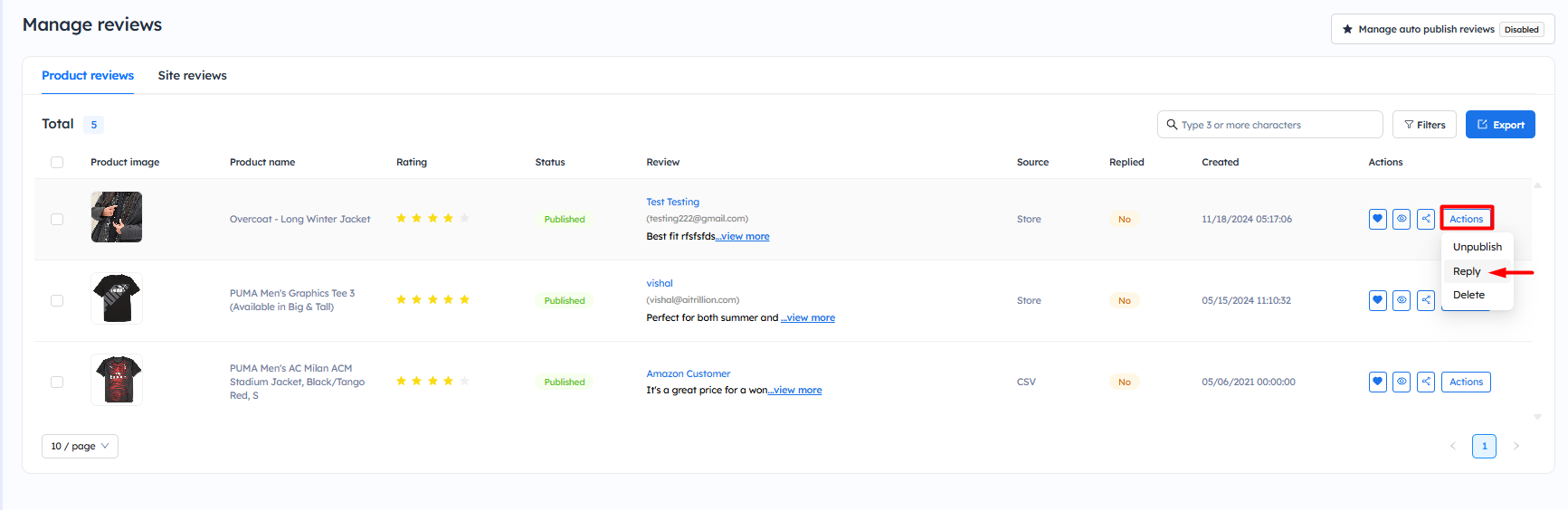
Step 2: Now, scroll a little bit to the right, click on the Action button, and click on Reply to reply on the specific tab.
Step 3: A popup will appear where you can write your reply, notify the customers, and publish the reviews, and then click on the Submit button to save.

Note: Check the following things:
1.) Notify customer by email - If the customer's email is available, they will be notified when you reply—provided the 'Notify Customer' setting is enabled.
2.) Publish - This includes the following case:
i.) When the auto-publish setting is enabled, any reply to a review will also be automatically marked as published. You can disable this option by unchecking the Publish box.
ii.) If the auto-publish settings is disabled, any reply to a review will not be automatically published. If you write the reply and enable the Publish box, the review will be automatically published.
iii.) If the review is unpublished and you click the 'Publish' button after replying, the reply will be published automatically along with the review
iv.) If you uncheck the 'Publish' button while the review is published, the review will automatically be unpublished.
iv.) If you uncheck the 'Publish' button while the review is published, the review will automatically be unpublished.
Now, you will be able to see your replies on the product review page.
Follow similar steps for the Site Reviews.
Follow similar steps for the Site Reviews.