Setup Multiple Announcement Bar
Introduction:
Enhance your website's communication strategy by implementing multiple announcement bars. This article explores the benefits and methods of setting up multiple bars, enabling you to effectively convey diverse messages, promotions, and updates to your audience, ultimately boosting engagement and driving conversions.
Follow the below steps to set up multiple announcement bars on your Shopify store:
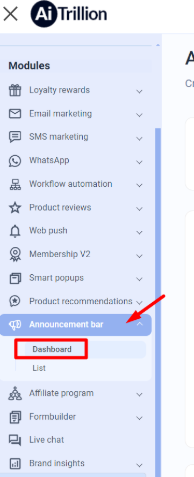
Step 1. Go to Announcement Bar > Dashboard.
Step 2. Now, click on the View All button as shown in the picture.
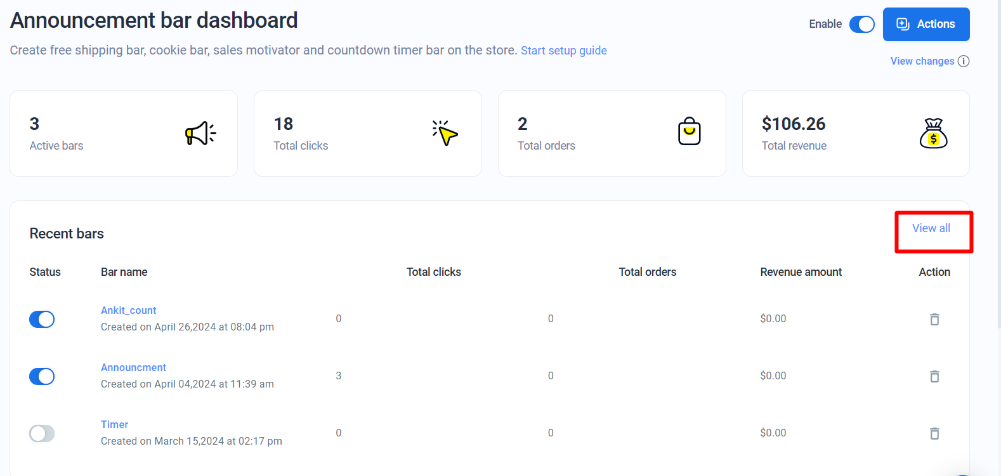
Step 3. This screen will appear. Here you can see the list of announcement bars that you have created already.
Now, you can enable the bar that you want to display on your Shopify store. This way, you can enable multiple bars.
Follow the below steps to set up multiple announcement bars on your Shopify store:
Step 1. Go to Announcement Bar > Dashboard.
Step 2. Now, click on the View All button as shown in the picture.
Step 3. This screen will appear. Here you can see the list of announcement bars that you have created already.
Now, you can enable the bar that you want to display on your Shopify store. This way, you can enable multiple bars.