Send Automated WhatsApp Notifications to Internal Team Member or Specific Individuals

Send Automated WhatsApp Notifications to Internal Team Member or Specific Individuals

Introduction

Automated WhatsApp notifications can help keep your internal team informed about important customer activities and business events in real time. Using Workflow Automation, you can send WhatsApp notifications to specific individuals or team members whenever predefined conditions are met, such as new customer registrations, order placements, support requests, form submissions, or other workflow events. This enables faster response times, improves team collaboration, and ensures that key updates are delivered instantly without manual intervention.


Here are the steps to send automated WhatsApp notifications to internal team members or specific individuals:

Step 1: Go to Workflow automation >> Workflow >> click on Create from scratch.


Step 2: Drag and drop the desired trigger into the workflow editor. Then, from the Actions section, drag and drop the Send WhatsApp Internal action and connect it to the trigger.


Step 3: Click on the Send WhatsApp internal. A left-side bar will appear, which includes the following options:
Recipient: Search for and select the recipient to whom you want to send the internal WhatsApp message.
WhatsApp template: Select the WhatsApp template that you want to send to the selected recipient.


Step 4: Give a name to the Workflow, set up contact throttling, and mark the workflow as active.
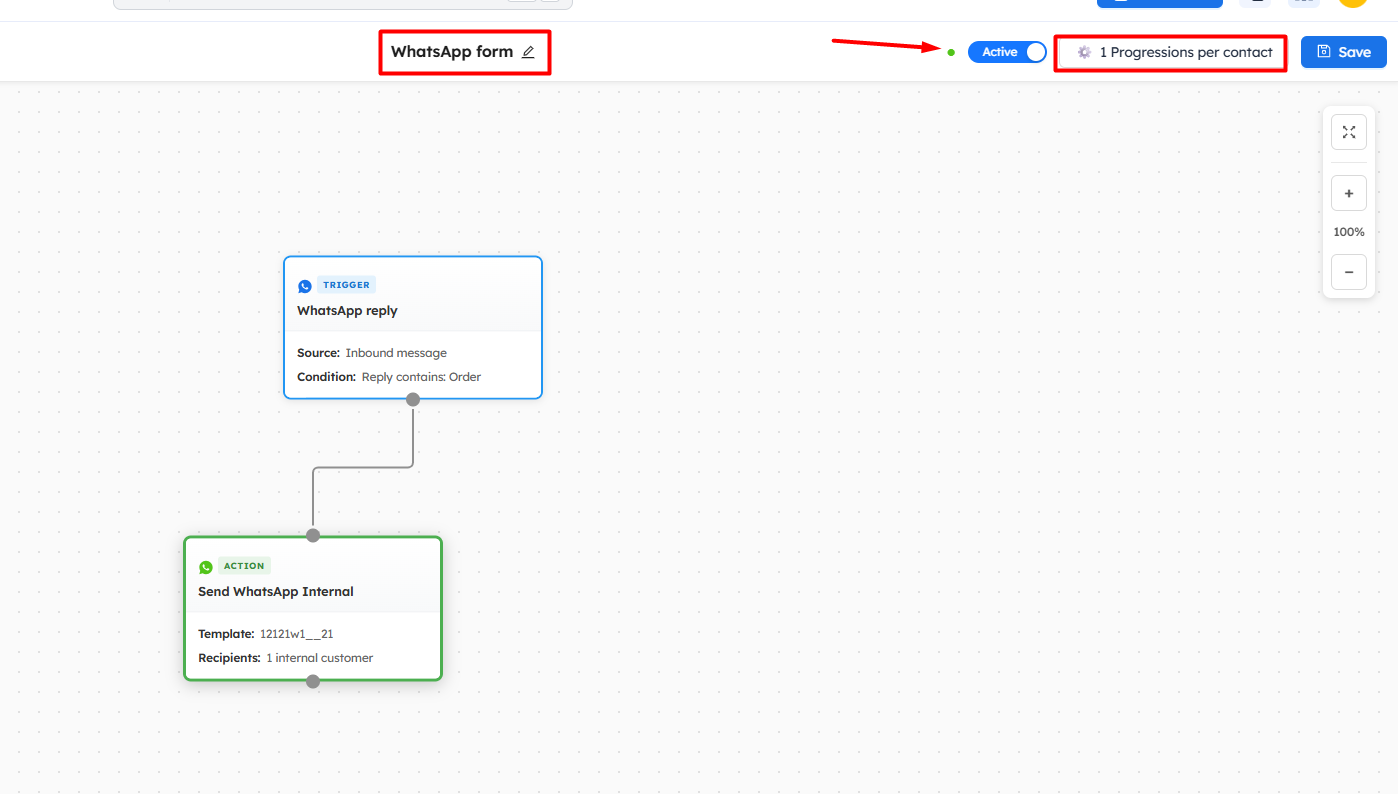


Now, whenever a customer enters the trigger, a WhatsApp message will be automatically sent to the selected recipient.
    • Related Articles

    • Send Automated WhatsApp Messages Using Workflows

      Introduction Automated WhatsApp messages help businesses engage with customers at the right moment without manual effort. By using workflows, you can automatically send WhatsApp messages based on specific customer actions or events, such as signing ...
    • Manage WhatsApp Conversations with Team Inbox

      Introduction The Team Inbox (WhatsApp) enables you to efficiently manage all customer conversations from a single, centralized dashboard. It allows your team to view, organize, assign, and respond to WhatsApp messages in real time, ensuring no ...
    • Send a WhatsApp Campaign to Customers

      Introduction WhatsApp campaigns are a powerful way to communicate with your customers instantly and promote your products, offers, or important updates. By sending targeted WhatsApp messages, businesses can increase engagement, drive traffic, and ...
    • Send WhatsApp Template Messages Using API

      Introduction Sending WhatsApp template messages using API allows you to automate communication and reach customers instantly with approved messages. This is especially useful for sending transactional updates, notifications, and alerts directly from ...
    • Send automated SMS using workflow

      Introduction Sending automated SMS using workflows allows you to instantly reach customers with timely and personalized messages based on their actions or behavior. Whether it's order updates, reminders, promotions, or alerts, SMS automation ensures ...