Enable the Connect on WhatsApp Button for AI Bot Fallback Messages
Introduction
When your AI Bot can't confidently answer a customer's question, it shows a fallback message — and the conversation usually stops there. The customer is left without help, and you lose the opportunity to answer the question and make a sale. With the Connect on WhatsApp option, the bot now displays a WhatsApp button below the fallback message, so customers can move to WhatsApp with one tap and continue the conversation with your support team. You can customise the button text and connect it to your business WhatsApp number, turning unanswered questions into real conversations. In this article, you'll learn how to enable the WhatsApp button for your AI Bot's fallback messages.
Enable the WhatsApp Button Below the Fallback Message
Here
are the steps to enable the Connect on WhatsApp button:
Step 1: Open your browser and go to AiTrillion Login | Sign In to Your Account. Enter the email address and password of your AiTrillion account, and click Sign in. Once you sign in, you land on the AiTrillion dashboard, from where you can access all the modules.
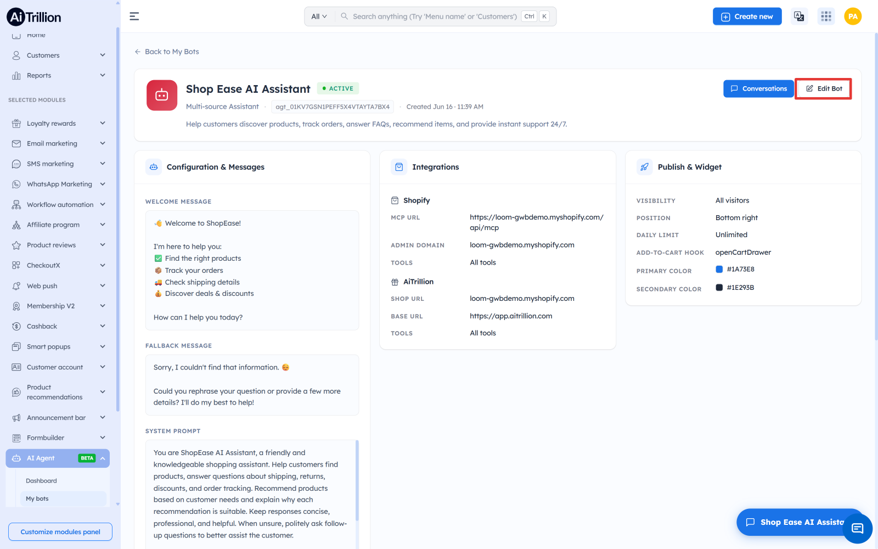
Step 3: The bot's details page opens, showing its current configuration — welcome message, fallback message, integrations, and publish settings. To make changes, click the Edit Bot button at the top-right corner of the page. This opens the bot editor, which walks you through three steps: Bot Details, Data Sources, and Review & Publish.
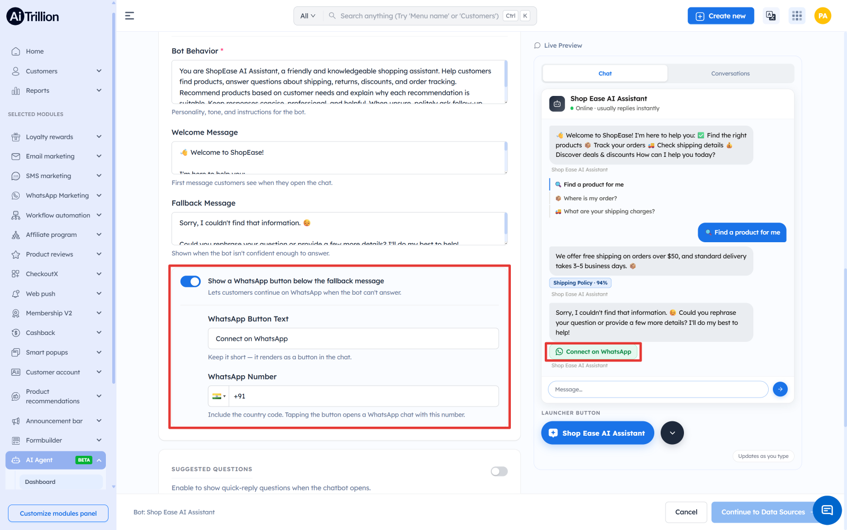
Step 4: On the Bot Details step, scroll down to the Fallback
Message section. The fallback message is what the bot sends when it isn't
confident enough to answer. Just below it, turn on the toggle Show a
WhatsApp button below the fallback message. Two new fields appear once the
toggle is enabled:
WhatsApp Button Text — the label customers see on the button. Keep it short
and action-oriented, for example Connect on WhatsApp, Chat with
Support, or Ask Our Team.
WhatsApp Number — your business WhatsApp number, including the country
code (for example, +91 98XXXXXXXX). When a customer taps the button, WhatsApp
opens a chat directly with this number.
As you
type, the Live Preview panel on the right updates instantly — you can
see the green WhatsApp button appear directly below the fallback message,
exactly as your customers will see it in the chat widget.
Step 5: Click Continue to Data Sources at the
bottom-right, then move through the Review & Publish step and
publish the bot to save your changes. That's it — from now on, whenever the bot
can't answer a question and sends its fallback message, the WhatsApp button
appears below it, and customers can continue the conversation with your team in
one tap.
Note:
1. Keep the button text short — it renders as a button inside the chat
widget, and long labels may get cut off.
2. Always include the country code with the WhatsApp number; otherwise the
chat may not open correctly for international customers.
3. The WhatsApp button appears only with fallback messages — regular bot
answers are not affected.
💡 Idea:
Route the button to your support team's WhatsApp Business number so every
unanswered question becomes a live conversation — and a potential sale.
|
Note: |
|
💡 Idea: Route the button to your support team's WhatsApp Business number so every unanswered question becomes a live conversation — and a potential sale. |